50% off — Special pricing for our founding clients during the 2027 budget season →
SiteWalk Pro — a walk checklist leaving a warehouse, map pin in the wordmark

From site walk to action plan in minutes.

Pin every issue as you find it, add photos, select the scope and mark the urgency. By the time you’re back at your desk, the photos are organized, the vendor RFPs are ready to go out and the owner’s report is already written.

Request a walkthrough Watch the overview

Built for commercial property managers, by a commercial property manager. Retail centers, industrial, campuses.

One walk in. Every document out.

The smarter way to walk, document, and manage your properties.

SiteWalk Pro automatically turns the inspection you’re already doing into vendor-ready bid packets, owner’s summaries and next year’s budget recommendations; each one carrying the photo, the pinned location, and the scope note you captured on site.

Open the interactive demo. No sign-up needed.

The problem

The walk is step one. Step two is where your week disappears.

You’re not short on diligence. You’re short on the hours it takes to turn an inspection into something anybody can act on.

Your camera roll is not a record.

Four hundred photos, multiple properties, no labels. By Thursday you’re zooming out on a photo of a curb trying to figure out which property it was at and whether anyone emailed a vendor yet.

You’re doing the work twice.

Once on foot. Once at your desk, retyping the same issues into an email, a spreadsheet, a to-do list for the team. The repetitive work is what keeps you late at the office.

You know what you saw but does your assistant?

The inspection is done but now multiple conversations about what’s needed next begin to occur. Descriptions of issues get tangled with batches of photos and chaos ensues.

Three vendors, three different scopes.

“Which pothole? How big? Can you send a picture?” The details never made it into the request, so every bid comes back priced against a different assumption and there’s nothing to compare.

Ownership rarely gets inspection reports that take significant resources to complete.

Owners assume monthly inspections are being performed but rarely receive a formal report because it takes too much time. Recurring issues may have been identified but the documented case for budgeting a repair gets lost.

And then the insurance claim arrives.

Eighteen months after a trip-and-fall, someone asks you what you knew and when. “I’m sure we addressed that” isn’t enough. A time-stamped, GPS-pinned photo showing it’s been addressed is.
How it works

Three steps. You were already doing two of them.

1

Walk and pin

Tap the map where you’re standing. Pick the issue off a preset list. Snap a photo, set the urgency and move on. The pin lands at a true GPS point on your property aerial or your uploaded site plan. So “the curb at the southeast entrance” stops being a debate.

The walk map with color-coded issue pins on a property aerial
2

The paperwork writes itself

Every pin sorts itself by trade. One tap turns the asphalt pins into a formal RFP with your logo and includes scope notes, photos and a numbered pin map, ready to send to three vendors bidding the exact same job.

A generated request for proposal with company logo and scope details
3

Send it, track it, report it

RFP packets go to your own vendors and the app records who got what and when. Ownership gets a clean property summary with a custom note from you at the top. Anything you flagged as “budget” rolls into a budget report you can use to collect pricing for next year.

An owner's summary report with masthead and property details
What comes out

Four documents you’d otherwise be writing tonight.

This is the part your owner sees. It’s also the part that takes you hours.

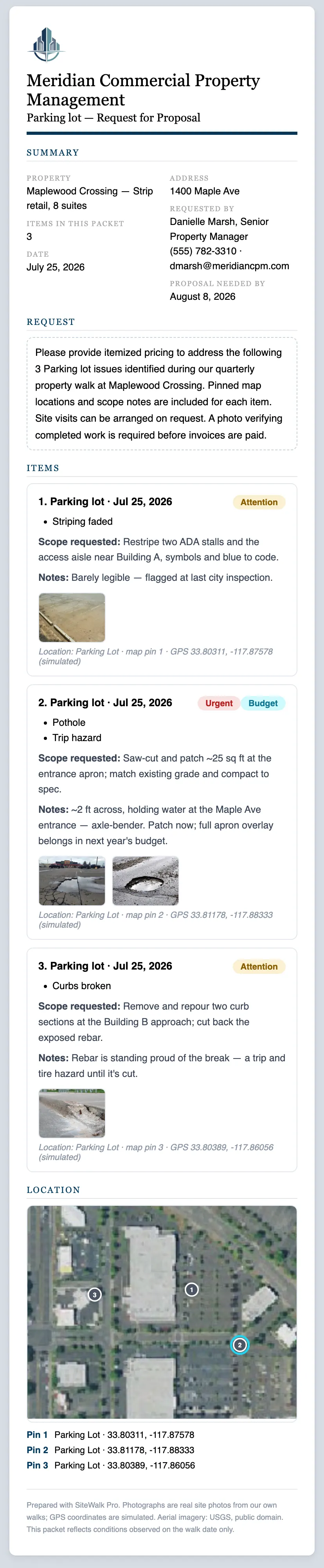
The vendor RFP

By trade, on your letterhead. Numbered pins, photos, scope notes, and a site map — so three vendors bid the same job and the numbers actually compare.

Sample vendor RFP document — scroll to read the whole report

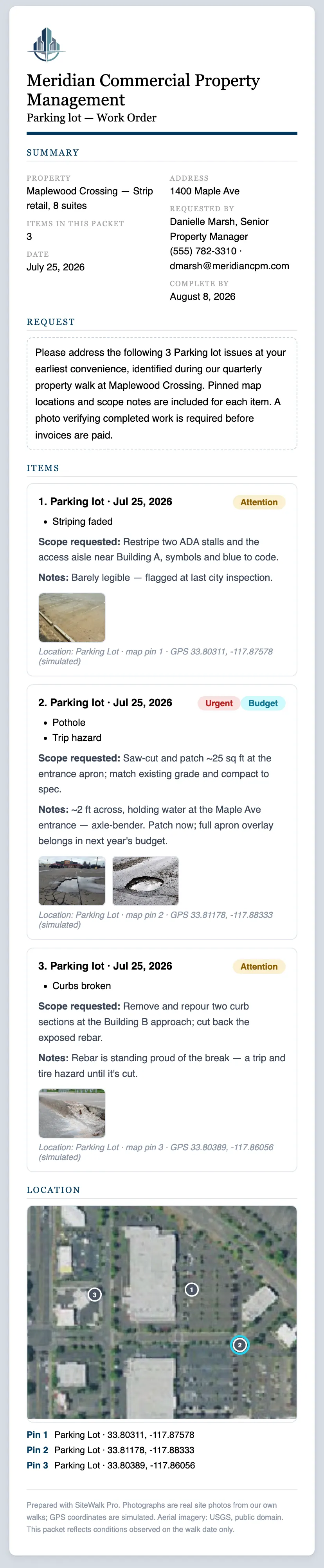
The vendor work order

For what can’t wait. Goes out with the location and the photo attached — and tells the vendor a completion photo is required before invoices are paid.

Sample work order document — scroll to read the whole report

The owner’s summary

What you found, what it costs, what you’re doing about it, with your note to ownership on top. The report that makes October easy because you’ve been writing it all year.

Sample owner's summary document — scroll to read the whole report

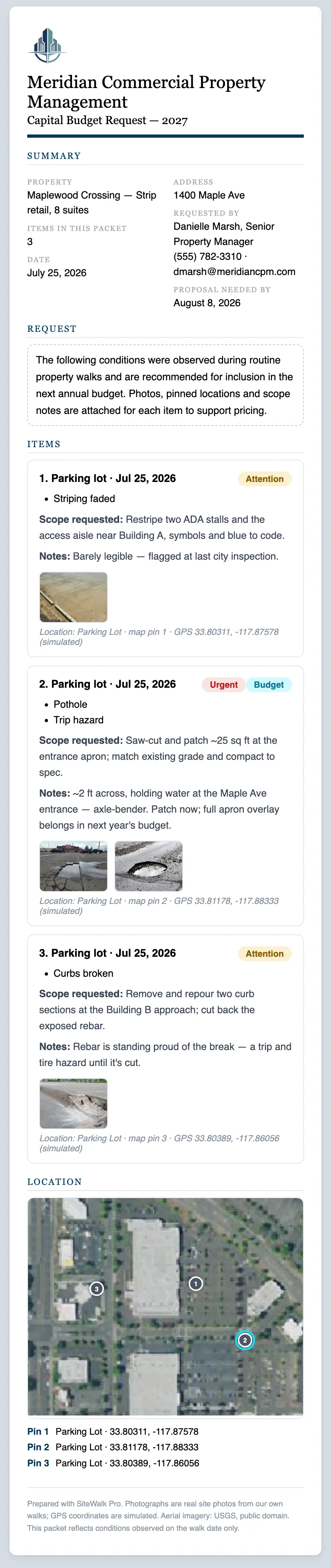
The budget packet

Every issue you flagged as capital, gathered into one ask with photos and history attached. Not a number you defend from memory — a case.

Sample capital budget request document — scroll to read the whole report
Features

Everything the walk needs. Nothing it doesn’t.

📍On the walk

  • Tap-to-pin on your property aerial or an uploaded site plan, at true GPS
  • 150+ preset issues, taken from a former property manager’s own taxonomy
  • Runs in the browser and installs to the home screen. No app store, no IT ticket.

📄The paperwork

  • RFPs by trade, owner’s summaries, budget packets
  • Your logo on everything, with opening paragraphs you can edit before it sends
  • Every packet asks the vendor for a completion photo before invoices are paid

🤝Vendors and follow-through

  • Your own vendor directory, tagged by trade
  • A send log: who got which packet, and when
  • Issue timelines, and recurring-problem detection across walks

📊The office view

  • Live updates for office staff as the property is being inspected
  • Daily digest of open issues by property
  • Portfolio view: open counts, aging, closure rate
  • The full issue log, searchable and filterable
Unlimited users. Always. Day porter, maintenance technician, property assistant, property manager. Everyone can do inspections with no counted seats.
A recoverable expense, not overhead. Priced per square foot, per property — so it drops into each property’s operating budget alongside your landscaping and sweeping contracts, recoverable the way they are. Not another bite out of your management fee.
See the full feature list
  • Multiple buildings and street addresses per property: retail centers, flex industrial, business parks, campuses
  • Upload a site plan or drone shot when the satellite view isn’t enough; it becomes the property’s default map
  • Per-property access: property teams see only their portfolios
  • Owner entity per property, printed on bid packets and budget requests
  • Preferred vendors per property: each site’s regulars offered first when sending
  • Anything deleted is recoverable for 30 days: pins, photos, and history intact
  • Editable date-found on every issue, so Tuesday’s inspection typed up Wednesday stays Tuesday’s inspection
  • Several items on one pin: “wall pack, soffit lights, timers” is three things to price, not one

“We already have a system for this.”

🛠️If it’s a work order platform

Keep it. SiteWalk Pro is the step before the work order: the walk, the documentation, the bid package. Export anything, any time, into whatever you’re already running.

📋If it’s a clipboard and a camera roll

Then you already know exactly where the hours go.

🕸️If it’s the inspection module nobody on your team uses

Usually that’s multiple clicks per issue and no way to use it one-handed in the rain. They’re cumbersome and still require multiple conversations, emails and photo sorting.

Security

Your property data handled properly.

  • Every company’s records isolated at the database level. One company can never read another’s.
  • Encrypted in transit and at rest, on SOC 2 Type II and ISO 27001 certified infrastructure in the United States.
  • Daily encrypted backups, and 30-day recovery on anything deleted.
  • Export every issue and photo to a spreadsheet whenever you want. Close the account and we delete your workspace completely within 30 days.

View the Privacy Policy.

Limited availability — in time for the 2027 budget season

The Founding Client Program

A small number of commercial property management firms get live access at their real properties with a direct line to the people building this.

As a founding client, you’ll receive:

  • Preferential founding-client pricingLock in a significantly reduced introductory rate.
  • White-glove implementationYou fill in one onboarding workbook — properties, team, vendors — and we load it, fetch your site aerials, place your logo and invite your team.
  • Team trainingWe’ll train your team and help you get up and running.
  • Direct access to our teamNo waiting in a generic support queue.
  • A voice in product developmentYour feedback will directly help shape future SiteWalk Pro features.
  • Early access to new featuresGet first access to new functionality as we develop it.
  • Founding-client statusYou’ll be among the first organizations helping establish the new standard for commercial property inspections.

Limited to 10 founding organizations.

Ready to move forward?

See it on your own property.

Thirty minutes. We’ll walk you through one of your properties inside the app using your aerial, your issues, your reports.

Rather poke around first? The interactive demo is open, no sign-up.
Or just write to us: info@sitewalkpro.com

Questions

The ones every PM asks first.

What does it cost?

Pricing is based on square footage of the property and includes unlimited users and photo storage. Founding clients enjoy significantly reduced introductory pricing. Request a walkthrough and we’ll talk through the numbers for your actual portfolio.

Is there anything to install?

SiteWalk Pro is a cloud-based SaaS program. There’s nothing to download from the app store. It lives on the browser and updates automatically. If your team can take a photo on their phone, they can use this app.

Do my staff need training?

We pride ourselves on having developed a simple, easy-to-use platform because we know property managers have plenty on their plate already. Upon sign-up, we will provide a short video to walk through the app and a link to our user guide. Most people are productive on their first inspection. It’s that easy.

Does it replace our work order system?

It doesn’t have to. Most firms keep what they have and use SiteWalk Pro for inspections, photo organization, documentation and requests for proposals.

What happens if I don’t have a cell signal?

Photos are compressed on the phone so slow connections keep up with the inspection. A truly dead corner still needs a bar of signal before pins will load.

What if we stop using it?

Your data is yours. Export every issue and photo to a spreadsheet from inside the app whenever you want. Close the account and we delete your workspace completely within 30 days.

Where does our data live, and how is it protected?

In the United States, encrypted in transit and at rest. Every company’s records are isolated at the database level — one company can never read another’s. Full details are in the privacy policy.

Still have one? info@sitewalkpro.com